For Shopify stores
The questions your store gets every day, drafted and ready.
What Hobson handles
The questions that fill a store’s inbox, each with the order looked up first.
Where is my order?
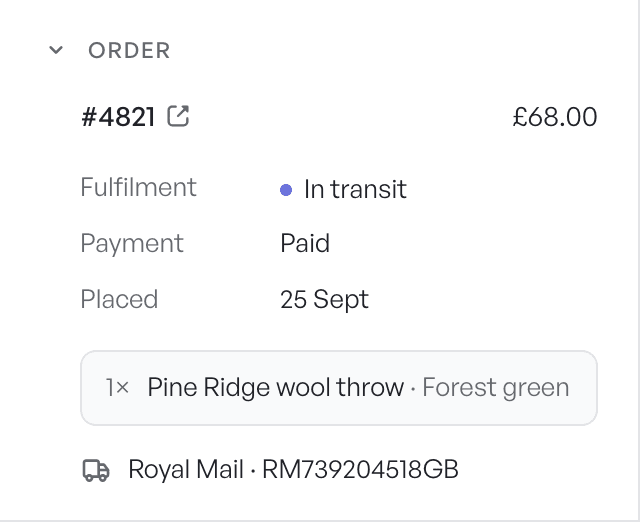
Hobson finds the order by number or email, reads the tracking and drafts a reply with the real status and carrier link.
Returns and refunds
It answers from your returns policy and, when a refund is due, proposes it in Shopify alongside the reply.
Damaged or wrong item
It reads the customer’s photo, then proposes a refund or a replacement order on the affected lines.
Change of address
If the order hasn’t shipped, it proposes the address change for you to approve.
Cancel my order
It checks whether the order can still be cancelled and lines up the cancellation.
Discount codes
It can create a one-off discount code for a customer, within the limits you set.
Getting started
- 1
Connect Shopify and your inbox
Install Hobson from Shopify, then connect Gmail or forward your support email. Add the chat embed to your theme if you want live chat.
- 2
Bring your history
Import tickets, customers, macros and tags from Gorgias, or let Hobson learn from your sent Gmail replies.
- 3
Add your policies
Upload your returns, refunds and shipping policies so Hobson answers from your rules.
- 4
Approve drafts
Every conversation gets a draft with the order beside it. Approve, edit or redraft.
- 5
Let it send what it has proved
Once a category such as order status has a track record, switch it to send automatically.
What stays with you
- Nothing sends without approval until a category has earned it.
- Refunds, returns and other policy questions stay locked until your policy is in the knowledge base.
- Every automatic reply has a minute to undo, and one switch pauses everything.
- Every action Hobson and your team take is in the audit log.
Questions
Put Hobson on duty.
Connect your inbox in a few minutes. Hobson drafts, you approve, and nothing reaches a customer until you say so.